



Ranger Series Handhelds
Durable and well-equipped for any challenge across multiple industries.
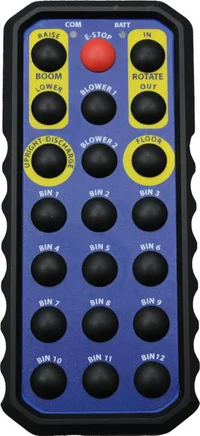
Up to twenty-one buttons of control.
The Ranger allowed 12 custom functions, and the Super Ranger up to 21, including Emergency Stop capability. The tough polymer enclosure makes this handheld durable and well-equipped for any challenge.
The ability to control the crane or other industrial equipment from outside of the cab eliminates the need for most 2-man teams. The operator has the freedom to move around the work site, controlling the vehicle with precision and accuracy from a safe distance while getting the best vantage point.
- 30 hour (DSS, FHS) or 120 hour (ASK) continuous use rechargeable battery, with low battery indicator
- Receiver output can be selectively interlocked to other operations for safety reasons
- Optional external receiver antenna extends range from 100 ft. to up to 1000 ft. in optimal operational environments
- Modular components and an external set-up button on the receiver allow for easy installation and field replacement
- Transmitter and receiver are uniquely paired, eliminating accidental cross-operation
Example Modes of Operation
MOMENTARY
While button is pressed, channel is active. When button is released, channel is deactivated. If communication is lost with handheld for more than 500 milliseconds, the channel will deactivate.
LATCHED
When the button is pressed, the channel will turn on and remain on after the button is released. The next button press will then turn off the channel. If the receiver is setup with Safelink, the channel will turn off when the Safelink timer expires.
EMERGENCY LATCHED
When the button is pressed, the channel will activate or deactivate and remain in this state until the receiver power is reset. E-Stop will remain latched even if the Safelink timer expires.
QUERY
The channel will activate after 5 minutes if the ‘QUERY’ button is not pressed. After the first 4.5 minutes, the alarm will sound for the remaining 30 seconds. If there is a Query Enable channel set up, the Query timer will not run unless the enabled channel (PTO, for example) is first turned on.
ENABLE
Used in association with other operations where the Enable button must be pressed first. After the Enable button is pressed, the other associated channel button can then be pressed for the desired operation (available with Momentary or Latched operations).
TIME DELAY
Associated with a latched channel. When a latched channel is activated after a specified time, the Time delay channel will automatically activate. The Time Delay channel will turn off when the associated channel is turn off.
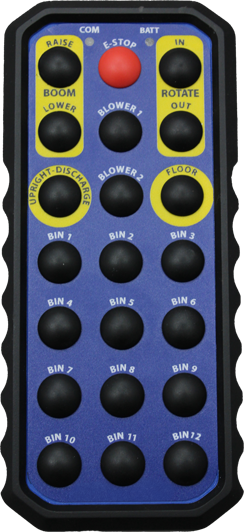
Super Ranger with 21 buttons of operation.
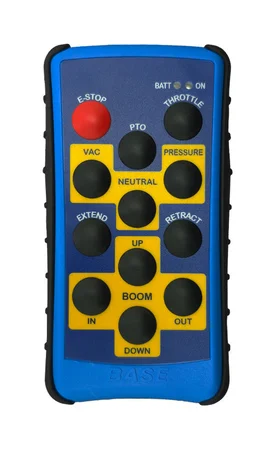
Ranger with 12 buttons of operation.
Two options. Incredible control.
Need help? Contact support.
Customer Support
Reach Out to Our Customer Support Team for Prompt Assistance and Answers to Any Questions or Concerns You May Have
Technical Support
Contact Us for Technical Support on Your Projects and Resolving Any Technical Issues You Encounter
Contact a Distributor
Locate a Nearby Distributor for Replacement Parts
Product Enquiry
Product Information request form to find the right solution
Need help? Contact support.
Customer Support
Reach Out to Our Customer Support Team for Prompt Assistance and Answers to Any Questions or Concerns You May Have
Technical Support
Contact Us for Technical Support on Your Projects and Resolving Any Technical Issues You Encounter

BASE ENGINEERING HEADQUARTERS
600 Rothesay Ave.
Saint John, New Brunswick, Canada E2H 2H1
Phone: (800) 924-1010

Copyright © 2026 OPW, A Dover Company, and its affiliated entities.